Concepts
The handful of ideas ipm is built on.
- Sources
- The catalog
- Repos are roots; references are extra
- IDs
- Search
- Packs
- Scopes
- Pins and the lock
- What ipm never does
Sources
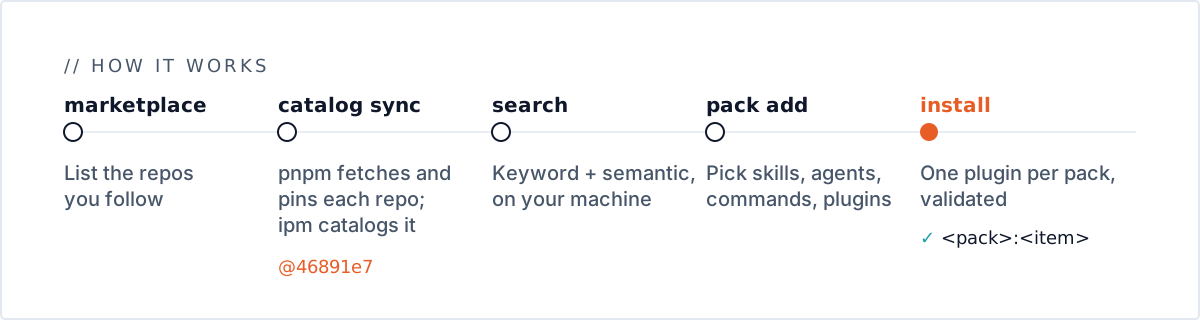
A source is a repo of interest: a GitHub owner/repo, or any git URL, optionally at a tag, branch or commit. Your sources are personal: one list per user, kept in your ipm home and usable from any project. The marketplace is the curated list of repos worth following (ipm marketplace shows it, with a check mark on the ones you follow); following a repo from it, or any other, makes it a source.
Under the hood your sources are a single pnpm project with one git dependency per repo. ipm marketplace add edits it; ipm catalog sync has pnpm fetch every repo and pin it to a commit in pnpm-lock.yaml. Later syncs keep those commits until you run ipm catalog sync --upgrade. See the sources guide.
The catalog
ipm catalog sync ends by building the catalog: one record for every artifact in your sources, with the commit it came from and links to what owns it.
| Type | What it is |
|---|---|
repo | A source, or a repo an external plugin lives in |
marketplace | A .claude-plugin/marketplace.json |
plugin | A Claude Code plugin: local (its own folder), inline (defined in a marketplace entry) or external (in another repo) |
copilot-plugin | A GitHub Copilot plugin |
skill | A folder with a SKILL.md |
agent | An agent Markdown file |
command | A slash command, in its own file or inline |
hook | A hooks.json hook |
mcp | An MCP server |
The catalog is rebuilt from the pinned commits, so the same pins always give the same catalog. It lives in your cache folder and can be deleted at any time; ipm catalog rebuild rebuilds it.
Repos are roots; references are extra
Every artifact belongs to the repo it lives in, and its tree starts there. A marketplace can also list a plugin that lives in another repo — an external entry. That’s a reference, not ancestry: the entry points at the other repo, and the other repo shows it is used by the first. How many other repos use a repo is shown in search results (↗N), the TUI’s tree and its e list, and breaks ties in search ranking.
IDs
Every artifact has an ID:
<type>:<repo>:<path in repo>          skill:obra/superpowers:skills/test-driven-development
<type>:<repo>:<path>#<name>           for items defined inside a file, such as an inline plugin
plugin:<marketplace repo>#<name>      an external plugin, listed by a marketplace in another repo
IDs carry no commit, so they survive syncs and upgrades. ipm search prints them; ipm show, tree, graph and pack add take them. Quote IDs containing # in your shell.
Search
ipm catalog serve runs Typesense in Docker on 127.0.0.1:8108, and ipm catalog rebuild (or ipm catalog sync) indexes the catalog into it. ipm search combines keyword matching on names, descriptions and tags with semantic matching on an embedding Typesense computes locally, so “c# testing” finds a “.NET test patterns” skill. Nothing leaves your machine. See Search and explore.
Packs
A pack is a named set of picked items in an ipm.toml:
[packs.csharp-sdlc]
description = "C# development lifecycle"
items = [
  "skill:wshobson/agents:plugins/dotnet-contribution/skills/dotnet-backend-patterns",
  "agent:wshobson/agents:plugins/jvm-languages/agents/csharp-pro.md",
  "plugin:anthropics/claude-plugins-official#stripe",
]
ipm pack build builds every pack into a Claude Code plugin of the same name, and ipm install claude builds when needed and installs a pack into Claude Code:
- Skills, agents and file-based commands are placed in the pack’s plugin, so they load as
<pack>:<item>. - Copilot plugins contribute their skills.
- Whole plugins become dependencies of the pack. They keep their own name, hooks and MCP servers, and Claude Code installs them with the pack.
- Hooks, MCP servers and inline commands can’t be picked on their own; they come with their plugin.
ipm pack addtells you which plugin to add instead.
ipm install gascity writes the same pack as a Gas City pack folder instead: skills, agents and the MCP servers of whole plugins you picked. Gas City has no slash commands or hooks, so those are skipped with a warning. ipm writes the folder and prints how to import it; it reads and edits no Gas City config.
Scopes
Packs live in a scope:
- Project scope (the default): the nearest folder at or above where you run
ipmthat holds anipm.toml.ipm pack newcreates one in the current folder if there is none. The built plugins go in that folder’s.ipm/. - User scope (
-g):$IPM_HOME/global, for packs you want in every project. Its marketplace is calledipm-global.
Pins and the lock
ipm pack build resolves every picked item to a repo, path and commit and records it in .ipm/ipm.lock. Later builds reuse those pins, so the plugin doesn’t change under you when your sources move. ipm pack build --update (or ipm install claude --update) re-pins everything to the commits in your current catalog.
Because the lock and pnpm’s pins are committed, anyone with ipm can rebuild the same plugin from your project without your sources or catalog. See Share packs with a team.
What ipm never does
- Run upstream code. pnpm runs with
--ignore-scripts, and sources’ npm dependencies are never installed. - Modify upstream repos. Picked files are hard-linked (or copied) from pnpm’s fetched copy.
- Edit a Gas City city.
ipm install gascitywrites a pack folder (in.ipm/.gascityunless you point it elsewhere) and prints the[imports]table to paste into the city’spack.tomlorcity.toml; ipm never edits a city. - Install into Claude Code on its own. Building writes only
.ipm/;ipm install claude(or an install from the TUI’s Packs or Installs tab) installs a pack, at the scope you choose, only when you ask. Each install is recorded (in the pack’s[[packs.<name>.installs]]table inipm.toml, or in$IPM_HOME/installs.jsonfor user-scope packs), and a bareipm installreplays them.